Firefox 3’s default behaviour is to do an “I’m Feeling Lucky” search on Google, which fetches the top result for the terms you entered, on Google. While this might seem helpful initially, Google’s lack of accuracy (or rather the lack of accuracy for top terms) in some results can get into your nerves.
If a regular Google search is your thing, here is how to configure Firefox to search on Google from your address bar:
- Type
about:configinto your address bar. - In the small filter box, type
keyword.URL. - Right click the
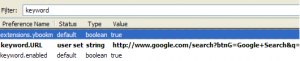
keyword.URLvalue and click “Modify” (screenshot below). Enter the following URL into the popup box (you would want to copy this URL before clicking Modify):http://www.google.com/search?btnG=Google+Search&q=
thanx alot that help me
to use encrypted search
-to use I am “I’m Feeling Lucky” https://www.google.com/search?btnI=Google+Search&q=
-or search normal http://www.google.com/search?btnG=Google+Search&q=
Thank you so much, it was so irritating running the I Feel Lucky results. Usually I would just install Google Toolbar but can’t do that on my Mac. Thanks again.
OK got it to work….thanks
tried this and several other strings with the same result…..it gives me lot’s of websites to pick from as opposed to opening the site I want. It did it till a few days ago…..don’t know what has changed
Thank you for this nice tip. I’m Feeling Lucky actually worked for “firefox address bar search like chrome” (to your site
), but I’ve been situations where I wasn’t feeling so lucky. haha
Thx easy and fast, works great!! thx!!!
Thank you so much. Worked like a charm.
I am using firefox in my office.
The keyword is set already but whenever i am giving something it directly putting http:// at beginning & showing error.
I am using the latest firefox…..pls help….
Thank you for this! It’s exactly what I was looking for!
Thank a bunch it worked great
Thank you so much!!! My browser was hijacked and you saved me.
Awesome, works perfectly!! Thanks!!
All you need to do is change one character in the default search string.
Change this:
http://www.google.com/search?ie=UTF-8&oe=UTF-8&sourceid=navclient&gfns=1&q=
to this:
http://www.google.com/search?ie=UTF-8&oe=UTF-8&sourceid=navclient&gfns=0&q=
Thank you very much! I had some lousy browser hijacker configure my FF to use Bing by default. You rescued me!
Thanks again!
THANK YOU SO MUCH! THE INFORMATION HELPED ME A LOT!
Hi after installing a software, it changed the address bar to yahoo search. I changed it like you said (normal google search) but I want it to be the “I’m Feeling Lucky” option, So how do I do to change it to the default settings?? :/
“CyberSearch Firefox Add-on does this job better. Just type in a search keyword and it’ll fetch Google search results for that keyword directly in awesome bar.”
Thanks for that. CyberSearch works great!
Hey, I am sorry, there was something wrong with another setting: Keyword.enabled was set to false!!!
Well, I followed your instructions to the letter, and I am still getting the “I’m feeling lucky” result – so instead of a list of matches, I am redirected to the first match.
thanks! is there a reason why it doesn’t work instantaneously though? there seems to be a few seconds between pushing enter and the google search results page being loaded.
Ahh, thank you for that! I’ve recently switched back from Chrome to FireFox, and the ‘I’m Feeling Lucky’ feature of the awesome bar was getting on my nerves. For me it’s useful 30% of the time. But now it acts how I want it. Great 😀
CyberSearch Firefox Add-on does this job better. Just type in a search keyword and it’ll fetch Google search results for that keyword directly in awesome bar.
Nice one. Loved this feature in Chrome
@Binny VA: This hack will not work if you are using OpenDNS. However, if you turn off some features like domain correction, then you will no longer be served OpenDNS search, and hence Google search will take over.
Will this work if you are using OpenDNS? Its not working on my system – it takes me to opendns search.
@DWiner
The hack I’m referring to here is for the addressbar, aka Awesome bar. I’m on Firefox 3, and the hack worked perfectly fine for me. Even for famous Google bombs like failure, it took me to a search page.
Perhaps you have not copy-pasted the complete URL?
I do not see the desired effect on FF after doing this hack. FF still does not search like Chrome’s address bar. Are you talking about the Google Search bar that is defaulted to the right side of FF’s toolbar?