Firefox (version 3 and above) has had history and bookmark suggestions in its address bar, which it calls “awesome bar”.
While this might be useful for some, there are users who prefer the old style of only URL suggestions in address bar. Furthermore, history suggestions might embarass you in front of others if you wanted to hide your browsing habits but forgot to clear history regularly.
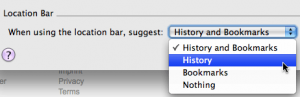
To solve that problem, you can disable history and bookmarks in Firefox by going to Tools > Options > Privacy tab (Firefox > Preferences > Privacy for Mac users), then changing “When using the location bar suggest” to Nothing. If you want to include bookmarks, then change it to Bookmarks.