Firefox has a host of addons which add useful functionality to the browser. In fact, many (including myself) would argue that it is the extensions that prevented a mass migration away from Firefox 2.
When you add extensions, your context menu (menu that comes up with a right-click) may become cluttered. Many of the extensions may add options to the context menu. Have one too many extensions, and you might soon find yourselves thinking “WTF?” at the multitude of options in the context menu.
For example, my context menu contains items like “Download all with DAP”, “Web Developer”, “Send Link” – all of which I’ve never used. Removing them will not reduce any functionality (because I do not need them), and instead reduce clutter.
Thankfully, there is a Menu Editor Firefox extension that does what its name says: edit your context menu.
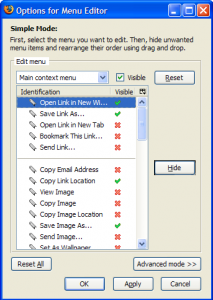
It appears that Menu Editor is incompatible with Firefox 3(read our review of Firefox 3) as of writing this, but you could probably get it working with a simple about:config hack(via):
- Type about:config into Firefox’s address bar and click “I’ll be careful, I promise!â€. Right-click anywhere and choose a new>Boolean. Name it extensions.checkCompatibility and set it false.
- Make another new Boolean value called extensions.checkUpdateSecurity and set it to false.
- Restart Firefox for the hack to work.
PS: I haven’t tested Menu Editor with Firefox 3, so proceed with caution; however, the hack works well for many other extensions.