The official rupee symbol was recently announced by Indian parliament. However, it will take several weeks for the design to be submitted and accepted in Unicode, and even longer for the symbol to be featured on keyboards.
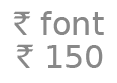 The tech community, however, has come forward with a free font that contains the rupee symbol. Below are the steps to type rupee symbol on any keyboard:
- Get the rupee font (it is a .ttf file).
- Install by moving it to fonts folder ( C:\Windows\Fonts for Windows). Mac users can install it by simply double clicking the .ttf file and hitting “install” in the dialog box that comes up.
- When typing, select Rupee font. Press the ` key (the key placed just above tab button) for the rupee symbol.
Please remember that the symbol is currently part of the font only, hence for anyone to see the symbol, they have to install the font too. This will change when the symbol is accepted as a special character, but we have to wait for that…