Website optimization is an important process for every webmaster trying to reach “the top”. It includes several parts, some of which may not be plausible for all. Optimisation refers to the cleaning of code markup, images and backend so that your site loads quickly, and causes less stress on your webserver.
The Importance of Optimization
Website optimisation is important, because more optimized pages translate into lower load times. In today’s world, “everyone wants everything quickly”, so quick and responsive sites help you to retain your visitors more. In other words, you can cut down or eliminate the number of frustrated surfers who ditch your blog because it doesnt load quickly. This is more relevant if your blog is targeted towards a non-tech-savvy audience, who are likely to have slower connections.
By optimization, you can save some bandwidth(although this is not why most people do it). Also, in times of intensive activity, like being Dugg or Stumbled, optimization can be the difference between your blog going offline due to stress, and your blog staying healthy even while getting ~50k visits in a day.
Some of the easiest optimization techniques include compression of codes whenever possible (like CSS), compression of images for lower sizes (use Photoshop), and reducing the number of http requests and number of objects. There are also hardcore stuff, including tweaking your webserver (which few can do), tweaking your scripts to execute faster, reduce the number of PHP functions in your theme etc.
My guiding light
Paul Stamatiou is an optimization-crazy college student, and has written several guides. I found Paul Stamatiou’s guides, How to Optimize your CSS and 5 ways to speed up your site amazing. After reading them a few times and implementing a few steps, I was able to cut down the loading time of this blog from 27 seconds on a dialup, to around 6 seconds! I used his blog as a benchmark, because he is pretty much up there with the best in optimization.
I took his advice to heart, and experimented a little more. More specifically, here are the steps (I will have a detailed How-to post later, so watch out!):
- Deleted all unnecessary images, like the RSS feed icon and Technorati Fav button.Saved 4Kb.
If you cannot abandon your images, at least move them to the same server ( uploads, or images folder). - Compressed the CSS using CleanCSS. Saved 3Kb.
- Used PHP compression for CSS stylesheet, as Stammy(above) suggested. Saved 2Kb.
- Removed the earlier header image, which was 500 x 200, and replaced it with a smaller 412 x 118px, with a white background. White backround was very helpful. Saved 10Kb.
So, that cut down the size by 19Kb, without compromising much on quality. I am not (yet) aware of all the server-side optimisation, so no comments there. Long story short, the optimisation bug is on me too 
On a lighter note, I actually managed to beat Stammy’s blog load times by a good margin.
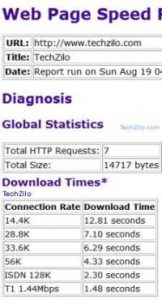
It is probably due to the sponsor images on his sidebar. His blog is hosted on MediaTemple’s (dv) server. For reference, this blog is on a shared webhost (for now).
Here are (56K speeds of ) some sites according to Web Page Analyzer, as of August 19, 2007
(Note: These are time taken for loading, and not actual rendering in the browser):
PaulStamatiou.com – 7.08 seconds
TechZilo (this blog) – 4.33 seconds
TechCrunch – 204.97 seconds
Why did I show these load times? Bragging rights? No.
Just to prove that even big sites like TechCrunch could do with a bit of optimization. I am sure that Mike Arrington will have no problem in wasting extra bandwidth, losing some frustrated visitors or being Dugg. However, 204 seconds is way too much by any standards.
So, make sure you optimize your blog the next time you decide to get your hands dirty in code 